

User Manual - ICV Calculator
The ADEPTS ICV Calculator helps you estimate your company’s In-Country Value (ICV) score by entering details related to your procurement, manufacturing cost, UAE assets, employees, revenue, and sustainability information.
The ADEPTS ICV Calculator has been developed in accordance with the official Ministry of Industry and Advanced Technology (MOIAT) ICV calculation framework. It follows the same calculation methodology, formulas, and scoring principles used for the government ICV assessment. When the same input data is provided, the calculator is designed to produce the corresponding ICV score while offering a simpler, faster, and more user-friendly experience.
The calculator is designed for two types of companies:
- Goods Manufacturer
- Service Provider
The sections shown in the calculator will depend on the company business type selected at the beginning.
This calculator provides an estimated ICV score based on the information entered. The final certified ICV score may differ after official review by an authorised ICV certifying body.
Step 1: Enter User Information
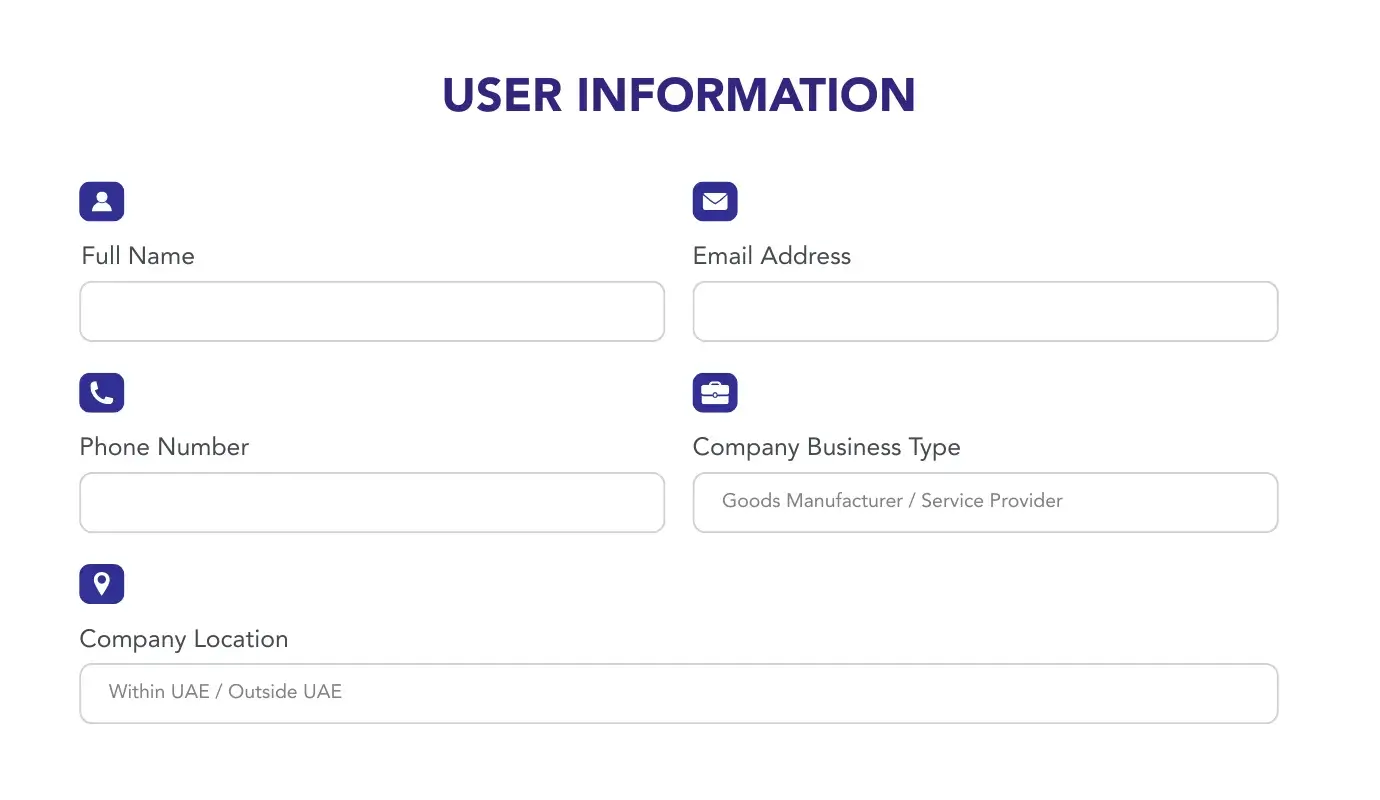
Start by entering your basic details.
You need to provide:
- Full Name
- Email Address
- Phone Number
- Company Business Type
- Goods Manufacturer
- Service Provider
- Goods Manufacturer
- Company Location
- Within UAE
- Outside UAE
- Within UAE
After entering the details, agree to the Terms and Conditions and continue to the next step.
If you select Service Provider, you will move to the Third Party Spend section.
If you select Goods Manufacturer, you will move to the Goods Manufactured section.
This step identifies the user and determines which ICV calculation path applies to the company.
Step 2: Goods Manufactured
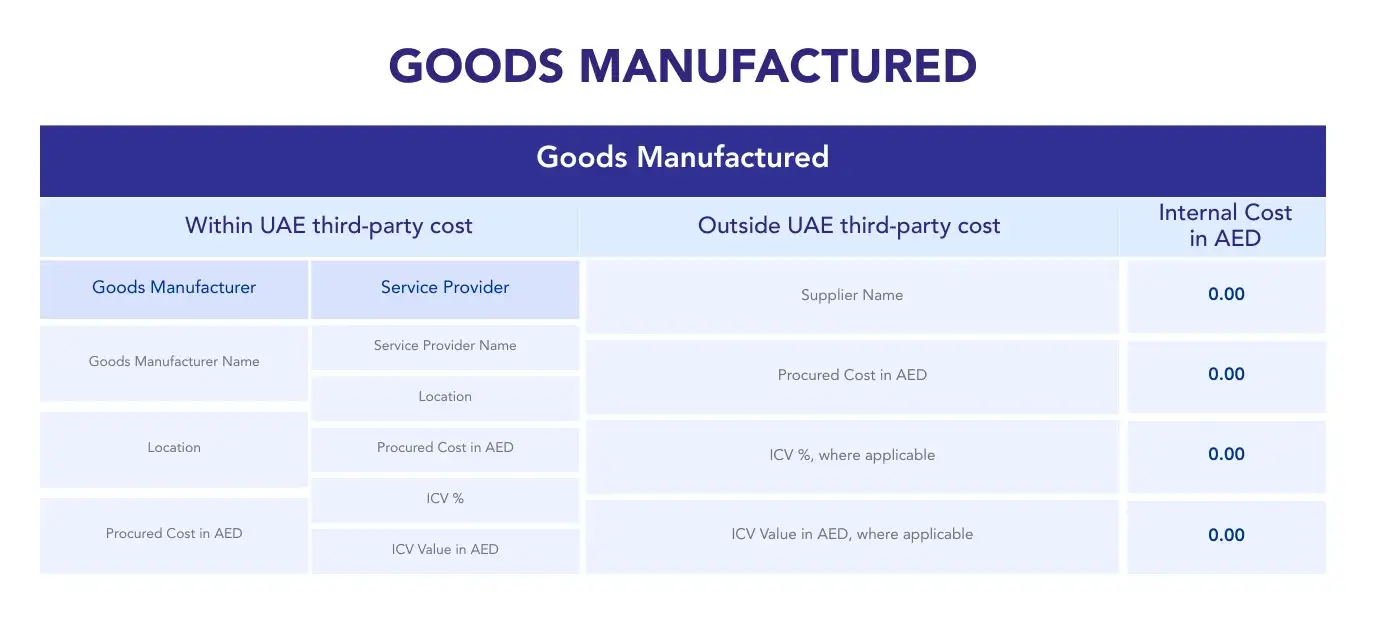
This section applies only to Goods Manufacturers.
For ICV calculation purposes, this section is generally applicable to companies holding an Industrial License and engaged in manufacturing finished goods.
In this section, enter the details of the goods manufactured by the company during the relevant financial year.
For each item, enter:
- Goods Description
- Within UAE third-party cost
- Outside UAE third-party cost
- Internal Cost in AED
Within UAE Third Party Cost
For costs incurred within the UAE, enter the supplier details under the relevant category.
Goods Manufacturer
Enter:
- Goods Manufacturer Name
- Location
- Procured Cost in AED
Service Provider
Enter:
- Service Provider Name
- Location
- Procured Cost in AED
- ICV %
- ICV Value in AED
Outside UAE Third Party Cost
For costs incurred outside the UAE, enter:
- Supplier Name
- Procured Cost in AED
- ICV %, where applicable
- ICV Value in AED, where applicable
Internal Cost
Enter the applicable internal cost in AED. This should normally relate to eligible internal manufacturing cost, such as depreciation or amortisation, where applicable.
The calculator will use the details entered to calculate the Total Goods Manufactured ICV %.
You can add more rows if there are multiple goods or product categories.
This step shows how much of the company’s manufacturing cost is linked to UAE-based value creation.
Step 3: Third Party Spend
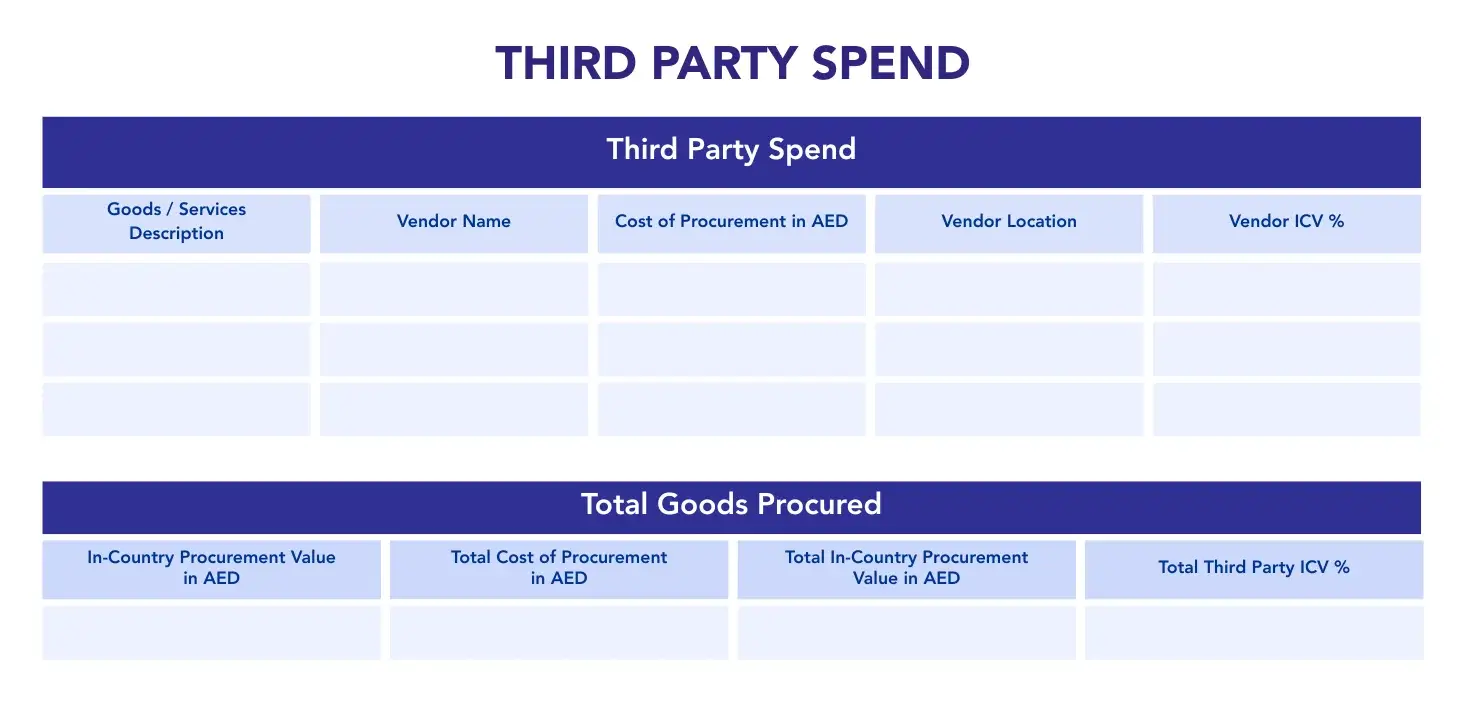
This section applies mainly to Service Providers.
For ICV calculation purposes, companies that do not hold an Industrial License are generally treated as Service Providers. This normally includes service companies, trading companies, and companies operating under commercial licences.
In this section, enter the goods and services purchased from external vendors during the relevant financial year.
For each entry, provide:
- Goods / Services Description
- Vendor Name
- Cost of Procurement in AED
- Vendor Location
- Vendor ICV %
The calculator will automatically calculate:
- In-Country Procurement Value in AED
- Total Cost of Procurement in AED
- Total In-Country Procurement Value in AED
- Total Third Party ICV %
Use the vendor’s valid ICV percentage where available. If a vendor does not have a valid ICV certificate, the applicable treatment should be based on the ICV guidelines.
You can add more rows if you have multiple vendors or procurement categories.
This step shows how much of the company’s external spending contributes to the UAE economy.
Step 4: Investment
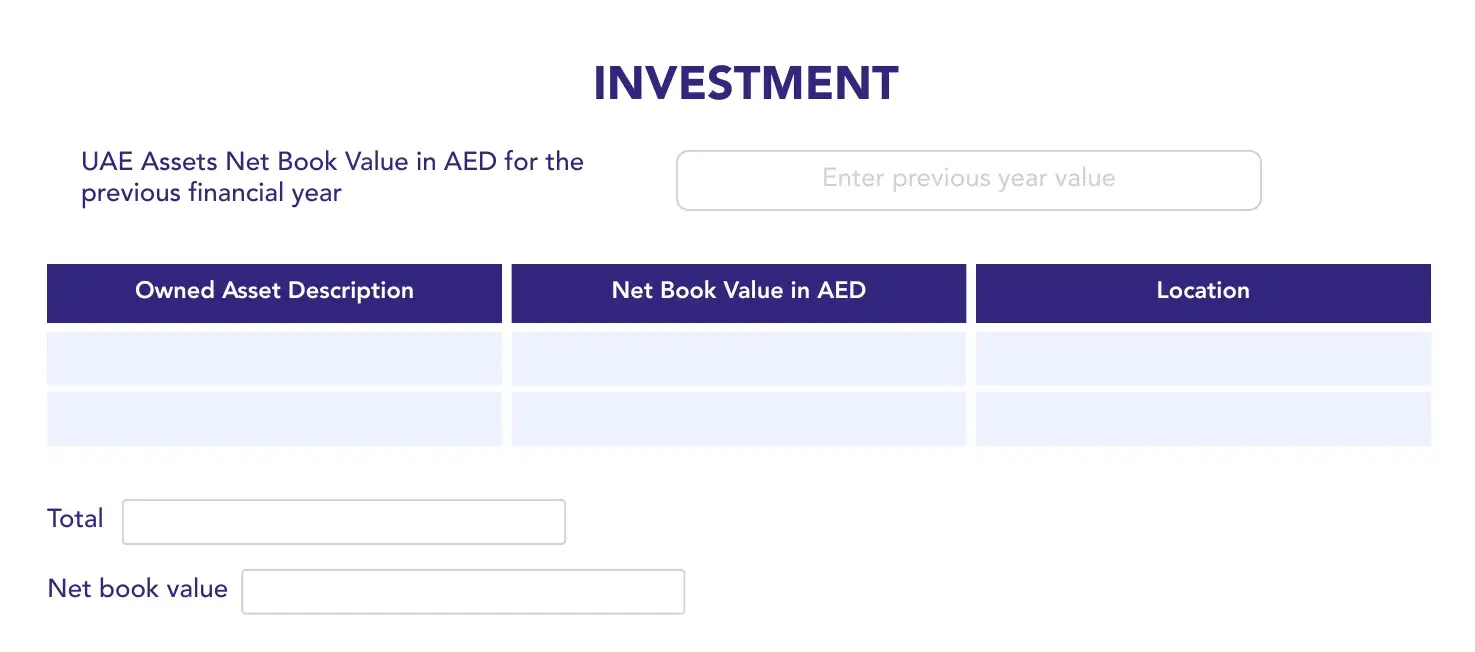
In this section, enter the company’s UAE-based assets.
First, enter the UAE Assets Net Book Value in AED for the previous financial year.
Then, add each owned asset by entering:
- Owned Asset Description
- Net Book Value in AED
- Asset Location, if applicable
Use the net book value based on the company’s financial records.
Only assets owned by the company and recorded in the company’s financial statements should be included.
The calculator will use this information to calculate the investment component and investment growth element of the ICV score.
This step shows the company’s level of investment inside the UAE and whether UAE-based assets have increased.
Step 5: Emiratization
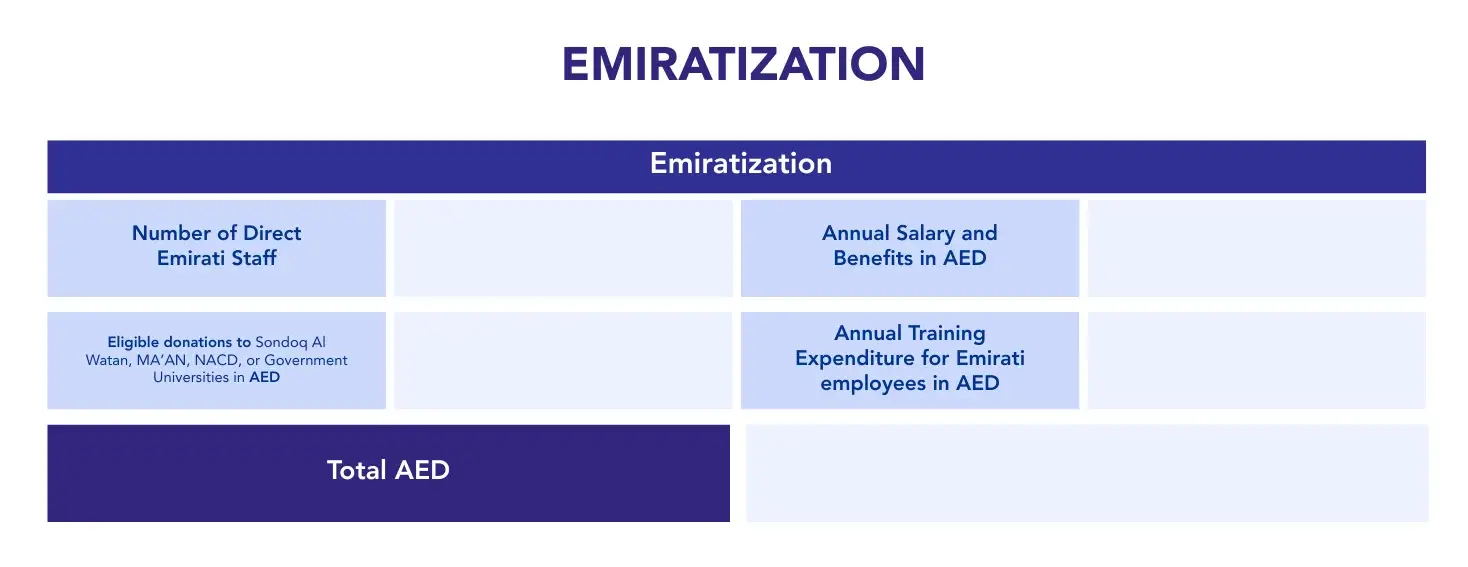
In this section, enter details of UAE national employees and eligible related costs.
You need to provide:
- Number of Direct Emirati Staff
- Annual Salary and Benefits in AED
- Eligible donations to Sondoq Al Watan, MA’AN, NACD, or Government Universities in AED
- Annual Training Expenditure for Emirati employees in AED
The calculator will calculate the total Emiratization value in AED.
This value is used to calculate the Manpower – Emiratization component of the ICV score.
This step shows the company’s contribution to UAE national employment, Emirati payroll, training, and qualifying Emirati development initiatives.
Step 6: Expatriates
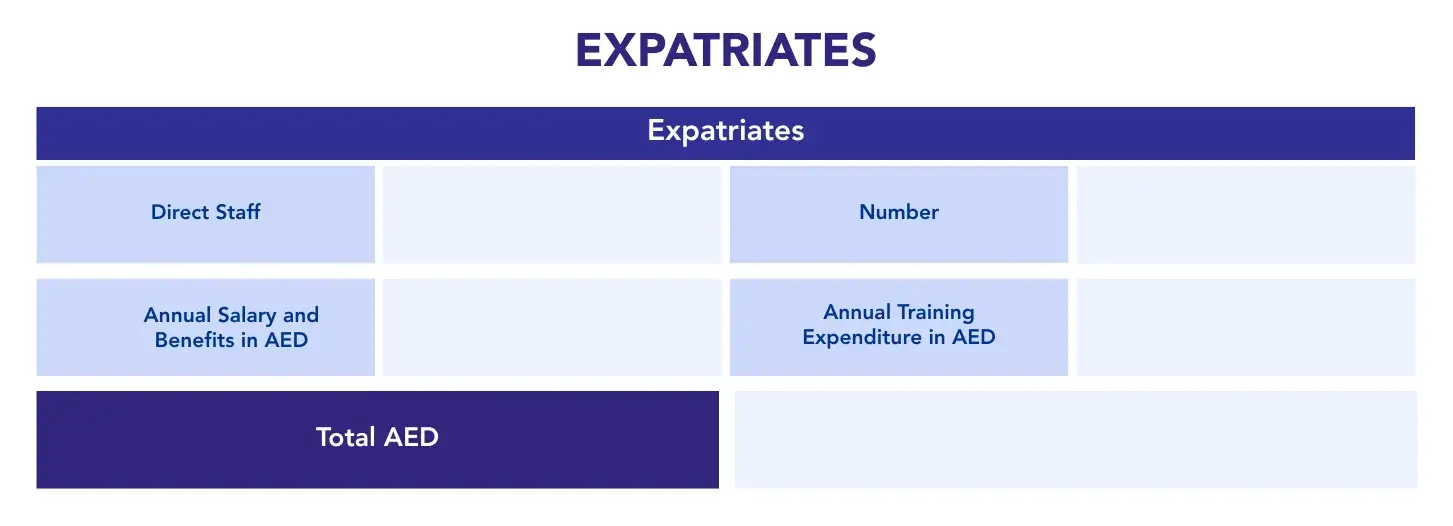
In this section, enter details of expatriate employees and related costs.
You need to provide:
- Number of Expatriate Direct Staff
- Annual Salary and Benefits in AED
- Annual Training Expenditure in AED
The calculator will calculate the total expatriate manpower value in AED.
This value is used to calculate the Manpower – Expats component of the ICV score.
This step shows the company’s UAE-based workforce contribution through expatriate employees, salaries, benefits, and training.
Step 7: Revenue
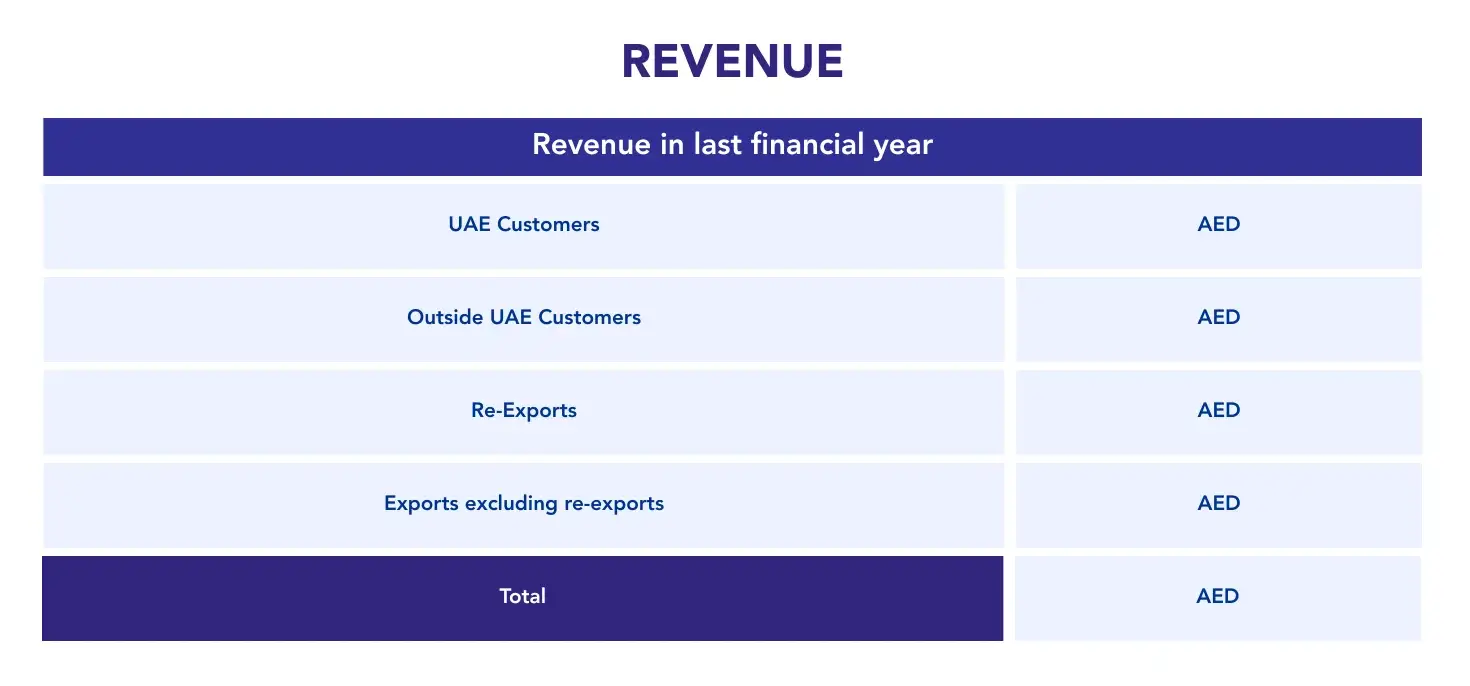
In this section, enter the company’s revenue for the last financial year.
You need to provide revenue from:
- UAE Customers
- Outside UAE Customers
- Re-Exports
- Exports excluding re-exports
Re-Exports means goods exported without value addition.
Exports excluding re-exports means revenue from outside the UAE where value has been added by the company.
The calculator will use this information to calculate the revenue-related part of the ICV bonus.
This step shows whether the company generates value-added export revenue from the UAE, which can support the ICV bonus calculation.
Step 8: Advanced Technology and Sustainability
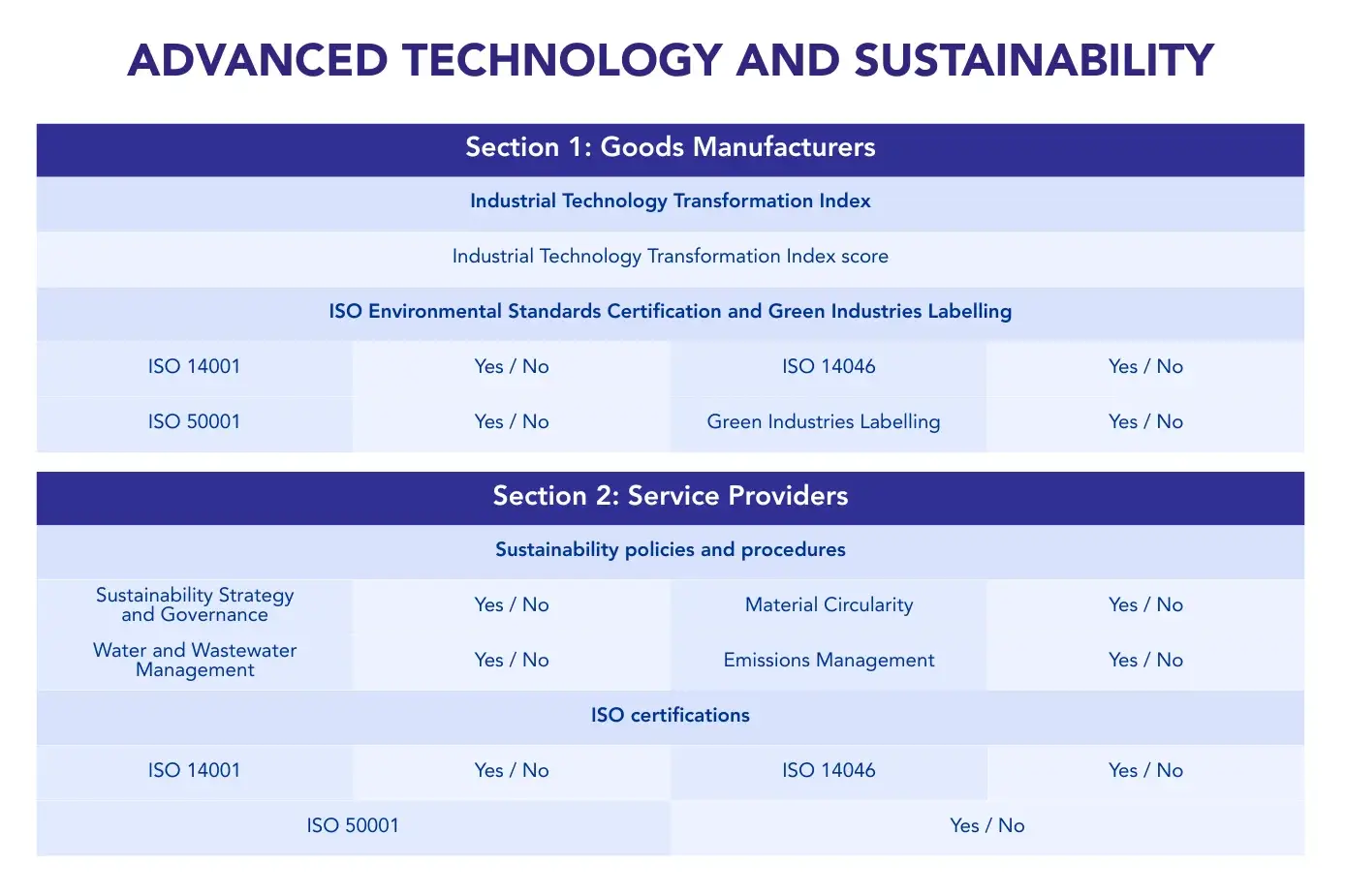
Fill only the section that applies to your company business type.
Section 1: Goods Manufacturers
Goods Manufacturers should complete this section.
Enter the following:
Industrial Technology Transformation Index
- Industrial Technology Transformation Index score
ISO Environmental Standards Certification and Green Industries Labelling
Select Yes or No for:
- ISO 14001
- ISO 14046
- ISO 50001
- Green Industries Labelling
These details are used to calculate the Advanced Technology and Sustainability Bonus for Goods Manufacturers.
Section 2: Service Providers
Service Providers should complete this section.
Select Yes or No for the following sustainability policies and procedures:
- Sustainability Strategy and Governance
- Material Circularity
- Water and Wastewater Management
- Emissions Management
Also select Yes or No for the following ISO certifications:
- ISO 14001
- ISO 14046
- ISO 50001
These details are used to calculate the Sustainability Bonus for Service Providers.
This step shows whether the company may qualify for additional ICV bonus points through technology adoption, sustainability policies, environmental certifications, or green industry recognition.
Step 9: Verify Email and View ICV Score
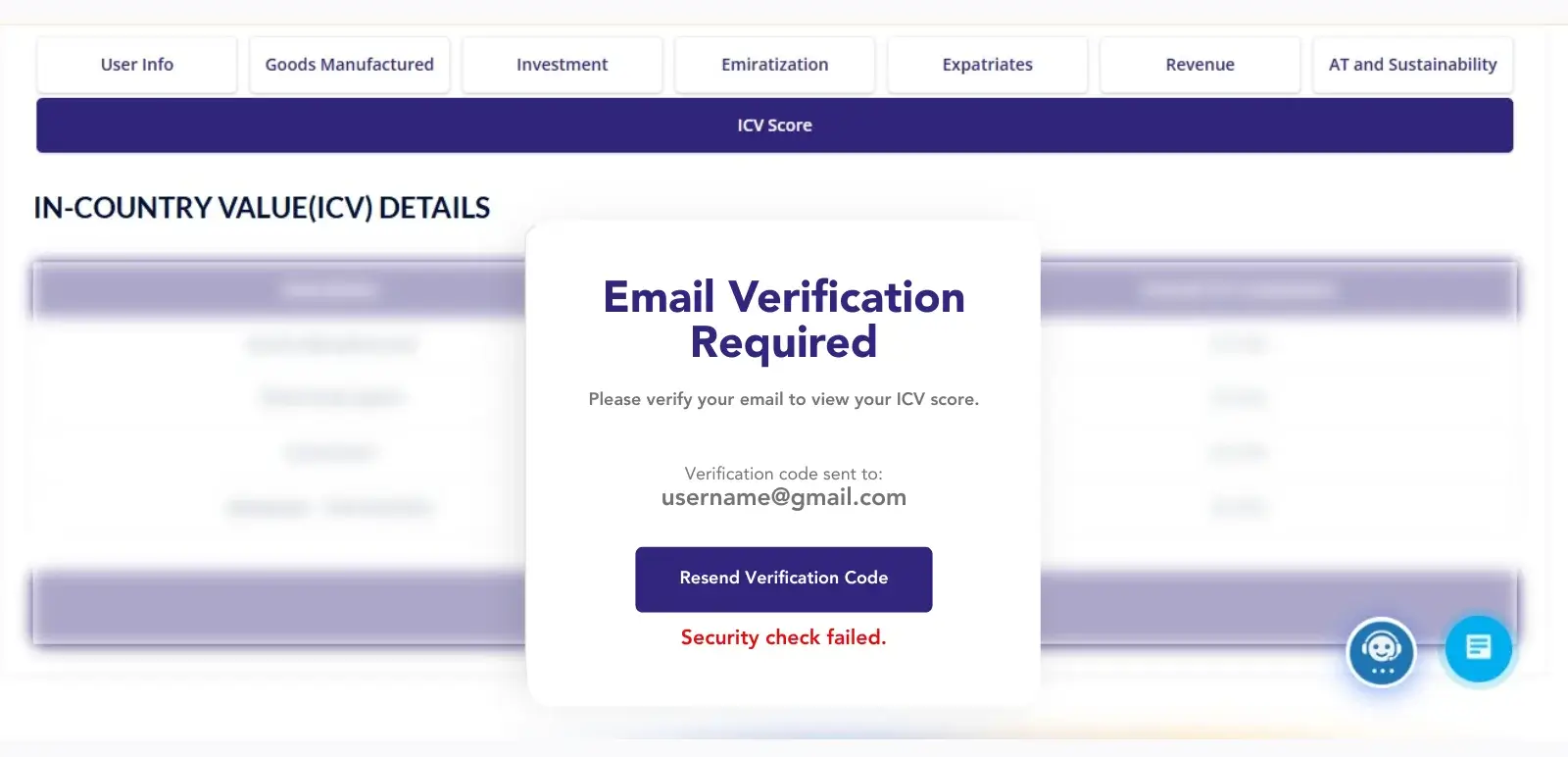
After completing the required sections, verify your email address to view the final estimated ICV score.
A 6-digit verification code will be sent to your email.
Enter the verification code in the calculator.
After successful verification, the calculator will display your estimated ICV score.
Final ICV Score Summary
The final summary shows the applicable ICV components based on your company type.
The summary may include:
- Goods Manufactured or Third Party Spend
- Investment
- Investment – Top Up
- Manpower – Emiratization
- Manpower – Expats
- ICV Bonus
- Advanced Technology and Sustainability Bonus
The ICV Bonus may consider:
- Revenue from outside the UAE
- Emirati headcount
- Investment growth
Each component will show its contribution to the overall ICV score.
At the end, the calculator will display the Total Estimated ICV Score as a percentage.
What a Higher ICV Score Means
A higher ICV score indicates that a company contributes more value to the UAE economy.
A higher score may support the company in:
- Supplier registration
- Tender evaluation
- Procurement opportunities
- Vendor assessment by participating entities
- Demonstrating stronger local economic contribution
The ICV score may improve when a company:
- Procures more goods and services from UAE-based suppliers
- Works with vendors that have valid and higher ICV scores
- Maintains assets in the UAE
- Employs UAE nationals
- Pays salaries and benefits to UAE-based employees
- Generates value-added export revenue
- Increases investment in UAE assets
- Implements sustainability policies
- Holds relevant environmental certifications
This calculator is designed to provide an estimated score for guidance purposes. It should not be treated as an official ICV certificate.


